
One of the most common problems I see when reviewing websites is weak structure. The design might look reasonable, the content might be helpful, but the site still feels hard to navigate. Pages are scattered, menus are overloaded, and related content is buried or missing entirely.
This usually happens because the site was built page by page rather than planned as a whole. Someone creates a homepage, adds an about page, starts a blog, and eventually ends up with something that no longer feels organised. Visitors have to work to find what they came for, and search engines have trouble understanding how the pages relate to each other.
Structure is one of the first things I plan before building any new site. Getting it right early saves a lot of rework later — and it has a direct effect on both usability and search visibility. If you are starting from scratch, the full guide on essential steps to build a website walks through the complete process, including how to plan your pages before you start building.
Quick Answer
Plan your site around the main topics your audience cares about. Group related pages into clear sections, keep your navigation simple and focused, and use internal links to connect related content. A well-structured site is easier to navigate and easier for Google to crawl and index.
Why Website Structure Matters
Structure affects two things: how visitors experience the site, and how search engines process it.
When a site is well organised, visitors can find what they need quickly. They understand where they are, where they can go next, and what the site is about. That reduces bounce rates and increases the chance they read more, contact you, or buy something.
For search engines, structure signals topical relevance. When related pages link to each other and are grouped logically, Google can understand what the site covers and how authoritative it is on those topics. A flat, disorganised site makes that harder. According to Google’s SEO Starter Guide, clear site organisation and descriptive navigation help both users and search engines understand your content.
Step 1: Identify the Main Sections of Your Site
Start by listing the main topics your site will cover. These become your primary sections — the top-level categories that everything else sits under.
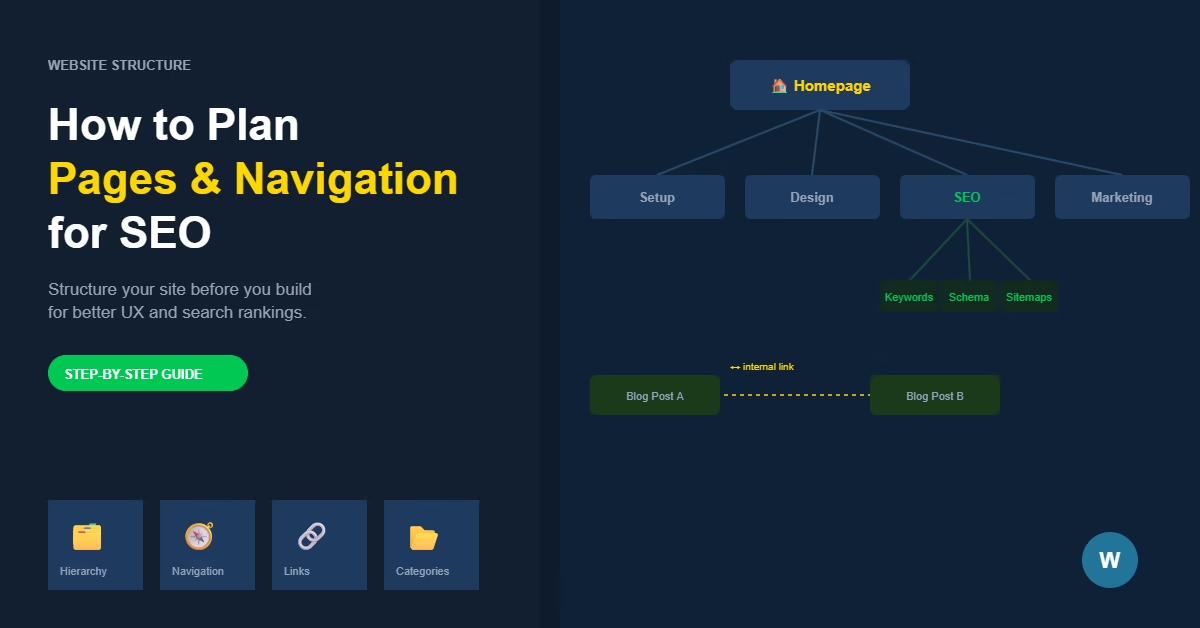
For a WordPress website focused on website building, those sections might be Setup, Design, SEO, and Marketing. For a local service business, they might be Services, Projects, About, and Contact. Keep the list to four to seven sections. More than that and the navigation becomes hard to scan.
Each section should represent a meaningful cluster of content — not just a single page, but a topic area that can expand over time as you publish more.
Step 2: Create a Logical Page Hierarchy
Once you have your main sections, map out the pages that sit within each one. Think in terms of levels: top-level pages cover broad topics, and sub-pages or posts go deeper into specific aspects of those topics.
A simple hierarchy for a portfolio site might look like this: a Services page at the top level, with separate pages for each individual service underneath. The services page gives an overview; the individual pages give the detail.
Avoid making everything a top-level page. If every page is equally prominent, nothing is. Hierarchy helps visitors understand what matters most and gives search engines a clear sense of priority.
Pages vs Posts
In WordPress, pages are for static content — your About, Contact, Services, and other permanent sections. Posts are for content that is regularly published and organised into categories, like a blog. Use pages for your site structure and posts for your ongoing content.
Step 3: Design a Simple Navigation Menu
Your main navigation menu should reflect the top level of your site structure — nothing more. Include your primary sections and a clear call to action if relevant, such as Contact or Get a Quote.
Keep the menu to five or six items at most. Dropdown menus can work for sites with clear sub-sections, but they add complexity. If you can link to sub-pages from within the relevant top-level page instead, that is often cleaner.
Test your menu on mobile. Many WordPress themes display menus well on desktop but become cumbersome on small screens. The navigation should be just as usable on a phone as it is on a desktop.
Step 4: Use Internal Links to Connect Related Content
Internal links do two things: they help visitors discover related content, and they pass relevance signals between pages. A post that links to a related post tells Google those topics are connected.
When you write a new page or post, think about which existing pages cover related ground. Link to them naturally within the content — not just at the bottom in a “related posts” block, but within the text where it makes sense.
Over time, build a deliberate internal linking structure rather than linking randomly. For a detailed approach, see How to Build an Internal Linking Strategy for a New WordPress Website.
Step 5: Organise Blog Content into Categories
If your site includes a blog or resource section, categories are how you group related posts. Each category should represent a meaningful topic area — not a miscellaneous catch-all.
Keep the number of categories manageable. Four to eight is usually right for a new site. Too many categories spread your content too thin; too few make it hard for visitors to browse by topic.
Each category page becomes a useful entry point for both visitors and search engines. A well-named category with a collection of strong posts on the same topic builds relevance for that subject over time.
Practical Tips
Plan your structure before you build. It is much easier to set up categories, page hierarchies, and navigation correctly from the start than to reorganise everything after content is live.
Use descriptive page names. “Services” is clearer than “What We Do.” “About Us” is clearer than “Our Story.” Visitors should know exactly what a page contains before they click.
Do not create empty sections. If a category or section page has nothing in it yet, do not add it to the navigation until there is content to send visitors to.
Review your structure every few months as the site grows. What made sense with ten pages may need rethinking at fifty.
Common Mistakes
Too many items in the navigation. Every item added to a menu dilutes the others. Keep it focused. Secondary pages should be reachable through internal links, not the main menu.
Publishing without a plan. Adding pages and posts without a clear structure leads to a site that grows in unpredictable directions. Topics overlap, categories multiply, and the overall shape becomes hard to explain.
Ignoring the homepage. The homepage is the most linked-to page on most sites and the first place many visitors land. It should make the site’s purpose immediately clear and direct people to the right sections.
Not linking between related posts. Posts that sit in isolation — with no internal links pointing to them or coming from them — are harder for visitors to discover and harder for Google to prioritise.
When a Simpler Approach Works
Not every website needs a complex structure. A one-page or five-page site for a local service business or freelancer may not need categories, multiple nav levels, or an elaborate internal linking plan.
For those sites, the priority is clarity: a homepage that explains what you do, a services or portfolio page, a contact page, and maybe an about page. That is enough to serve visitors well and give search engines what they need.
The more content you plan to publish over time, the more important structure becomes. Start simple and add complexity only as the site genuinely needs it.
Part of getting structure right is understanding how WordPress organises content. If you’re unsure whether something should be a page or a post, choosing between pages and posts in WordPress explains the distinction and gives a practical framework for deciding.
Once your structure is planned, the next step is deciding how each page should be laid out. The guide on how to choose a website layout for a new WordPress website covers page width, section structure, and mobile-first design — decisions that build directly on your structure foundation.
Conclusion
Map your main topics, create a clear hierarchy, keep your navigation simple, and connect related content with internal links. Do this before you build and you will avoid the most common structural problems that make websites hard to use and hard to rank. Once your structure is clear, the next practical step is setting up your WordPress navigation menu to reflect it.

Etienne Basson works with website systems, SEO-driven site architecture, and technical implementation. He writes practical guides on building, structuring, and optimizing websites for long-term growth.